
Phone Number Validation Best Practices: Clean Lists, Reduce Bounces & Improve Deliverability
Every contact center manager knows the frustration: your dialer churns through hundreds of numbers, but 15–30% bounce as disconnected, invalid, or undeliverable. These dead leads waste agent time, inflate costs, and drag down campaign ROI. The solution? Phone number validation best practices that clean your lists at every stage—from capture to dial. By implementing robust validation workflows, you can reduce bounce rates by up to 40%, improve contact rates, and ensure every number in your CRM is accurate, deliverable, and compliant.
Effective phone number validation reduces bounce rates by 30–40%, cuts wasted dial attempts, and improves first-contact resolution in outbound campaigns.
What This Guide Covers
This guide walks through the complete phone number validation lifecycle—from initial capture to ongoing list maintenance. You'll learn:
- Why invalid phone numbers cost you money and damage sender reputation
- The four stages of validation: capture, normalization, carrier verification, and consent filtering
- Format-only validation vs. carrier-level (HLR/LRN) verification
- How to validate numbers in real-time (API workflow examples)
- E.164 normalization and international best practices
- DNC, TCPA, and consent filtering requirements
- ROI calculations for list cleaning and validation
- A step-by-step pilot plan to implement validation in your contact center
Why Phone Number Validation Matters for Contact Centers
Invalid phone numbers create a cascade of problems:
1. Wasted Dial Attempts
Every disconnected or wrong number burns agent time and dialer capacity. If 20% of your list is invalid, you're wasting 1 in 5 calls—and paying for it.
2. Lower Contact Rates
Invalid numbers inflate your "no answer" and "busy" metrics, making it harder to measure true campaign performance. You can't optimize what you can't measure.
3. Damaged Sender Reputation
High bounce rates signal poor list hygiene to carriers. Repeated attempts to dial invalid numbers can flag your outbound traffic as spam, leading to number blocking or account suspension.
4. Compliance Risk
Dialing numbers on the National Do Not Call (DNC) registry or without proper consent exposes you to TCPA fines ($500–$1,500 per violation). Validation helps you scrub DNC entries before dialing.
5. Inflated Costs
Whether you pay per minute, per call, or per agent seat, invalid numbers increase your cost-per-contact. Cleaning your list reduces waste and improves ROI.
Bottom line: Phone number validation isn't optional—it's the foundation of efficient, compliant, and profitable outbound campaigns.
The Four Stages of Phone Number Validation
Effective validation happens at multiple touchpoints. Here's the complete lifecycle:
| Stage | What Happens | Tools/Techniques | Impact |
|---|---|---|---|
| 1. Capture-Time Validation | Validate as users enter numbers (web forms, call center intake) | Client-side regex, format checks, country code detection | Prevents typos, wrong formats, obviously invalid entries |
| 2. Normalization | Convert all numbers to a standard format (E.164) | libphonenumber-js, backend parsers | Ensures consistent storage, deduplication, and routing |
| 3. Carrier-Level Verification | Check if number is active, reachable, and assigned to a carrier | HLR/LRN lookups via telephony APIs | Identifies disconnected, ported, or landline vs. mobile |
| 4. Consent & DNC Filtering | Scrub against DNC registry, internal opt-out lists, and consent records | DNC scrubbing services, CRM consent flags | Ensures compliance with TCPA, GDPR, and internal policies |
Let's dive into each stage.
Stage 1: Capture-Time Validation (Prevent Bad Data at the Source)
The best time to catch invalid numbers is before they enter your system. Capture-time validation uses client-side checks to flag obvious errors as users type.
Best Practices for Capture-Time Validation
Use Format Validation (Regex + Length Checks)
Check that the number matches expected patterns for the user's country:
// Simple US/Canada phone number validation
function validateUSPhone(input) {
  // Remove non-digits
  const cleaned = input.replace(/\D/g, '');

  // US/Canada numbers: 10 digits (optionally 11 with leading 1)
  if (cleaned.length === 10) {
    return /^[2-9]\d{9}$/.test(cleaned); // Area code starts with 2-9
  }
  if (cleaned.length === 11 && cleaned[0] === '1') {
    return /^1[2-9]\d{9}$/.test(cleaned);
  }
  return false;
}

// Example usage
console.log(validateUSPhone('415-555-1234')); // true
console.log(validateUSPhone('123-456-7890')); // false (area code can't start with 1)
console.log(validateUSPhone('555-1234')); // false (too short)
Auto-Format as User Types
Use input masking to guide users:
// Auto-format to (XXX) XXX-XXXX
function formatPhoneInput(input) {
  const cleaned = input.replace(/\D/g, '');
  const match = cleaned.match(/^(\d{0,3})(\d{0,3})(\d{0,4})$/);
  if (!match) return input;

  const formatted = [
    match[1] ? `(${match[1]}` : '',
    match[2] ? `) ${match[2]}` : '',
    match[3] ? `-${match[3]}` : '',
  ].join('');

  return formatted;
}
Detect Country from IP or Form Field
If you're collecting international numbers, detect the user's country and apply the correct validation rules:
import { parsePhoneNumber, getCountries } from 'libphonenumber-js';

function validateInternational(phoneInput, countryCode = 'US') {
  try {
    const parsed = parsePhoneNumber(phoneInput, countryCode);
    return parsed && parsed.isValid();
  } catch {
    return false;
  }
}
Block Obviously Invalid Patterns
Reject numbers that are clearly fake:
- All zeros:
000-000-0000 - Sequential:
123-456-7890 - Repeating:
555-555-5555 - Test numbers:
555-0100to555-0199(reserved for TV/film)
function isTestNumber(cleaned) {
  const patterns = [
    /^0{10}$/, // All zeros
    /^1234567890$/, // Sequential
    /^(\d)\1{9}$/, // All same digit
    /^[2-9]\d{2}555(01\d{2}|0100)$/, // 555-01XX test range
  ];
  return patterns.some((p) => p.test(cleaned));
}
Capture-Time Validation Checklist
- Client-side format validation (regex + length)
- Auto-formatting as user types
- Country code detection for international forms
- Block test numbers, sequential patterns, all-zeros
- Real-time feedback (inline error messages)
- Fallback to server-side validation (never trust client alone)
Stage 2: Normalization (Convert to E.164 Standard)
Once a number passes capture-time validation, normalize it to E.164 format before storing in your database. E.164 is the international standard for phone numbers:
- Starts with
+and country code - No spaces, dashes, or parentheses
- Maximum 15 digits
Example:
(415) 555-1234 → +14155551234
Why E.164 Normalization Matters
- Consistent storage: No duplicates from different formats of the same number
- Global compatibility: Works with any telephony provider or VoIP platform
- Easy analytics: Extract country code, area code, and subscriber number programmatically
- API compliance: Most telephony APIs (including FoneSwift) require E.164 for outbound calls
Normalization Code Example
import { parsePhoneNumber } from 'libphonenumber-js';

function normalizeToE164(phoneInput, defaultCountry = 'US') {
  try {
    const parsed = parsePhoneNumber(phoneInput, defaultCountry);
    if (parsed && parsed.isValid()) {
      return parsed.format('E.164');
    }
    throw new Error('Invalid phone number');
  } catch (error) {
    console.error('Normalization failed:', error.message);
    return null;
  }
}

// Examples
console.log(normalizeToE164('(415) 555-1234', 'US')); // +14155551234
console.log(normalizeToE164('020 7123 4567', 'GB')); // +442071234567
console.log(normalizeToE164('invalid')); // null
Normalization Best Practices
- Always normalize before storing: Store E.164 in database; display formatted for users
- Handle international numbers: Use libphonenumber-js to support 200+ countries
- Drop leading zeros: Many countries (UK, Germany) use leading
0domestically; E.164 drops it - Validate after normalization: Ensure normalized number passes format checks
For a deeper dive into E.164, see our E.164 phone number format guide.
Stage 3: Carrier-Level Verification (Format vs. Live Validation)
Format validation (regex, length checks) tells you if a number looks valid. But it doesn't tell you if the number is active, reachable, or assigned to a carrier. That's where carrier-level verification comes in.
Format-Only Validation vs. Carrier-Level Verification
| Validation Type | What It Checks | Example Tools | Cost | Use Case |
|---|---|---|---|---|
| Format-Only | Syntax, length, country code validity | Regex, libphonenumber-js | Free | Capture-time, quick sanity checks |
| Carrier-Level (HLR/LRN) | Number is assigned, active, and reachable; line type (mobile, landline, VoIP) | HLR/LRN lookup APIs | $0.003–$0.01/lookup | Pre-campaign scrubbing, high-value lists |
What Is HLR/LRN Validation?
- HLR (Home Location Register): Queries the carrier's database to check if a mobile number is active and currently registered
- LRN (Local Routing Number): Checks if a number has been ported to a new carrier and identifies the current carrier
What you get from carrier validation:
- Active/Inactive: Is the number currently assigned?
- Line type: Mobile, landline, VoIP, toll-free, or premium
- Carrier: Which provider owns the number (useful for SMS deliverability)
- Ported status: Has the number been ported from the original carrier?
When to Use Carrier-Level Validation
- Before high-value campaigns: Validate leads before launching a major outbound campaign
- After list imports: Scrub purchased or scraped lists (which often contain 20–40% invalid numbers)
- Periodic list hygiene: Re-validate your database every 90–180 days (numbers churn)
- SMS campaigns: Ensure numbers are mobile (not landline) before sending texts
Sample API Workflow for Carrier Validation
Here's how to validate a number using a carrier lookup API:
// Example: Carrier validation API call
async function validateCarrier(phoneE164) {
  const response = await fetch('https://api.example.com/validate', {
    method: 'POST',
    headers: {
      'Authorization': 'Bearer YOUR_API_KEY',
      'Content-Type': 'application/json'
    },
    body: JSON.stringify({ phone: phoneE164 })
  });

  const data = await response.json();
  return data;
}

// Example response
{
  "phone": "+14155551234",
  "valid": true,
  "active": true,
  "lineType": "mobile",
  "carrier": "AT&T",
  "ported": false,
  "country": "US"
}
Action based on response:
valid: false→ Remove from listactive: false→ Remove or flag as disconnectedlineType: "landline"→ Flag for voice-only (no SMS)lineType: "voip"→ May have lower deliverability; flag for review
Carrier Validation Best Practices
- Validate purchased or imported lists before first contact
- Re-validate every 90–180 days (5–10% of numbers churn quarterly)
- Filter by line type for SMS campaigns (mobile only)
- Track validation cost vs. savings (see ROI section below)
- Use batch APIs for large lists (cheaper per lookup)
- Cache results to avoid duplicate lookups
Stage 4: Consent & DNC Filtering (Stay Compliant)
Even if a number is valid and active, you can't legally dial it without proper consent. The final validation stage is compliance filtering:
What to Scrub Against
- National Do Not Call (DNC) Registry: US-based consumers can opt out of telemarketing calls
- Internal opt-out lists: Track users who've requested no contact from your organization
- Consent records: Verify you have documented consent (TCPA, GDPR)
- Litigator lists: Phone numbers associated with TCPA lawsuit plaintiffs (high-risk)
DNC Scrubbing Workflow
// Example: DNC scrubbing before campaign launch
async function scrubDNC(phoneList) {
  const response = await fetch('https://api.dncprovider.com/scrub', {
    method: 'POST',
    headers: { Authorization: 'Bearer YOUR_API_KEY' },
    body: JSON.stringify({ phones: phoneList }),
  });

  const result = await response.json();
  // result.safe = numbers NOT on DNC
  // result.blocked = numbers on DNC or litigator lists
  return result;
}
Consent Best Practices
- Document consent: Store date, source, and opt-in method (web form, SMS double opt-in, verbal consent)
- Honor opt-outs within 30 days: TCPA requires you remove opt-outs from calling lists within 30 days
- Scrub before every campaign: DNC lists update frequently; scrub right before dialing
- Use suppression lists: Maintain internal suppression lists for users who've complained or requested no contact
For more on compliance and consent, see our AI IVR best practices guide.
Phone Number Validation API Workflow (End-to-End)
Here's a complete validation workflow for a contact center importing a new lead list:
import { parsePhoneNumber } from 'libphonenumber-js';

async function validateLeadList(leads, defaultCountry = 'US') {
  const results = { valid: [], invalid: [], flagged: [] };

  for (const lead of leads) {
    try {
      // Step 1: Normalize to E.164
      const parsed = parsePhoneNumber(lead.phone, defaultCountry);
      if (!parsed || !parsed.isValid()) {
        results.invalid.push({ ...lead, reason: 'Invalid format' });
        continue;
      }
      const e164 = parsed.format('E.164');

      // Step 2: Carrier validation
      const carrier = await validateCarrier(e164);
      if (!carrier.valid || !carrier.active) {
        results.invalid.push({
          ...lead,
          phone: e164,
          reason: 'Disconnected or inactive',
        });
        continue;
      }

      // Step 3: DNC scrub
      const dncCheck = await checkDNC(e164);
      if (dncCheck.onDNC) {
        results.flagged.push({
          ...lead,
          phone: e164,
          reason: 'On DNC registry',
        });
        continue;
      }

      // Step 4: Add enriched metadata
      results.valid.push({
        ...lead,
        phone: e164,
        lineType: carrier.lineType,
        carrier: carrier.carrier,
        country: carrier.country,
      });
    } catch (error) {
      results.invalid.push({ ...lead, reason: error.message });
    }
  }

  return results;
}

// Usage
const leads = [
  { name: 'Alice', phone: '(415) 555-1234' },
  { name: 'Bob', phone: '555-5678' }, // Invalid (too short)
  { name: 'Charlie', phone: '(212) 555-0001' }, // Test number
];

const validated = await validateLeadList(leads, 'US');
console.log(`Valid: ${validated.valid.length}`);
console.log(`Invalid: ${validated.invalid.length}`);
console.log(`Flagged: ${validated.flagged.length}`);
This workflow:
- Normalizes to E.164
- Validates with carrier lookup
- Scrubs against DNC
- Enriches with line type and carrier metadata
ROI of Phone Number Validation: Cost vs. Savings
Is phone number validation worth the cost? Let's calculate the ROI.
Example Scenario
- List size: 10,000 leads
- Invalid rate (unvalidated): 25% (2,500 invalid numbers)
- Cost per dial attempt: $0.10 (agent time + telephony)
- Validation cost: $0.005 per number (carrier lookup)
- Campaign duration: 1 week
Without Validation
| Metric | Value |
|---|---|
| Total dial attempts | 10,000 |
| Wasted attempts (25% invalid) | 2,500 |
| Cost of wasted dials | 2,500 × $0.10 = $250 |
| Total campaign cost | 10,000 × $0.10 = $1,000 |
With Validation
| Metric | Value |
|---|---|
| Validation cost | 10,000 × $0.005 = $50 |
| Invalid numbers removed | 2,500 |
| Valid dial attempts | 7,500 |
| Cost of valid dials | 7,500 × $0.10 = $750 |
| Total campaign cost | $50 + $750 = $800 |
Net savings: $1,000 - $800 = $200 (20% cost reduction)
Additional Benefits (Harder to Quantify)
- Improved contact rate: 10–15% higher first-contact success
- Better agent morale: Less time wasted on disconnected numbers
- Compliance protection: Avoid TCPA fines ($500–$1,500 per violation)
- Sender reputation: Reduced spam flags from carriers
Bottom line: Validation pays for itself within a single campaign, and the benefits compound over time.
Phone Number Validation Checklist
Use this checklist to audit your current validation process:
Capture-Time Validation
- Client-side format validation (regex + length checks)
- Auto-formatting as user types
- Country code detection for international numbers
- Block test numbers, sequential patterns, all-zeros
- Real-time inline error messages
Normalization
- All numbers stored in E.164 format
- libphonenumber-js (or equivalent) for parsing
- Leading zeros dropped for international numbers
- Validation after normalization
Carrier-Level Verification
- HLR/LRN lookups for high-value lists
- Filter disconnected and inactive numbers
- Enrich with line type (mobile, landline, VoIP)
- Re-validate lists every 90–180 days
- Batch APIs for cost efficiency
Consent & DNC Filtering
- Scrub against National DNC registry
- Maintain internal opt-out/suppression lists
- Document consent (date, source, method)
- Honor opt-outs within 30 days
- Check litigator lists for high-risk numbers
Ongoing Maintenance
- Automated validation for new imports
- Periodic re-validation (quarterly)
- Track bounce rates and validation accuracy
- Monitor compliance (DNC, TCPA, GDPR)
- CRM sync for enriched metadata
How to Implement Phone Number Validation in Your Contact Center (Step-by-Step)
Step 1: Audit Your Current List
Export your contact database and analyze:
- How many numbers are in E.164 format?
- How many have obvious formatting errors (too short, too long, non-numeric)?
- What's your current bounce rate?
Step 2: Choose Validation Tools
- Format validation: libphonenumber-js (free, open-source)
- Carrier validation: Choose an HLR/LRN provider (pricing: $0.003–$0.01 per lookup)
- DNC scrubbing: Subscribe to a DNC scrubbing service (pricing varies)
Step 3: Normalize Existing Database
Run a one-time normalization script to convert all numbers to E.164:
// Bulk normalization script
import { parsePhoneNumber } from 'libphonenumber-js';
import fs from 'fs';
import csv from 'csv-parser';

const results = [];
fs.createReadStream('contacts.csv')
  .pipe(csv())
  .on('data', (row) => {
    try {
      const parsed = parsePhoneNumber(row.phone, 'US');
      row.e164 = parsed.isValid() ? parsed.format('E.164') : 'INVALID';
      row.lineType = 'unknown'; // Placeholder for carrier lookup
    } catch {
      row.e164 = 'INVALID';
    }
    results.push(row);
  })
  .on('end', () => {
    console.log('Normalized', results.length, 'contacts');
    // Export to new CSV or update database
  });
Step 4: Implement Capture-Time Validation
Add client-side validation to all lead capture forms:
// Example: Real-time validation on web form
document.getElementById('phone-input').addEventListener('input', (e) => {
  const phone = e.target.value;
  const isValid = validateUSPhone(phone);

  if (isValid) {
    e.target.classList.remove('error');
    e.target.classList.add('valid');
  } else {
    e.target.classList.add('error');
    e.target.classList.remove('valid');
  }
});
Step 5: Set Up Carrier Validation for Imports
When importing new lists (CSV, CRM sync, API), run carrier validation:
// Import validation workflow
async function importAndValidate(csvPath) {
  const leads = await parseCSV(csvPath);
  const validated = await validateLeadList(leads, 'US');

  // Store valid leads
  await database.insertMany(validated.valid);

  // Log invalid leads for review
  console.log(`Invalid: ${validated.invalid.length}`);
  console.log(`Flagged (DNC): ${validated.flagged.length}`);

  return validated;
}
Step 6: Automate DNC Scrubbing Before Campaigns
Before launching any outbound campaign, scrub your list:
// Pre-campaign scrubbing
async function launchCampaign(campaignId) {
  const leads = await database.find({ campaignId });
  const phoneList = leads.map((l) => l.phone);

  // Scrub DNC
  const scrubbed = await scrubDNC(phoneList);
  const safeLeads = leads.filter((l) => scrubbed.safe.includes(l.phone));

  // Launch with safe numbers only
  await dialer.start(safeLeads);
}
Step 7: Monitor and Iterate
Track key metrics:
- Bounce rate: % of dials that fail (disconnected, wrong number)
- Contact rate: % of dials that reach a human
- Validation cost: $ spent on validation per lead
- Cost per contact: Total campaign cost ÷ successful contacts
Iterate on your validation rules:
- Are certain sources (e.g., web scraping) producing more invalid numbers?
- Should you re-validate more frequently (quarterly vs. annually)?
- Can you negotiate better pricing with your carrier validation provider?
Step 8: Integrate with CRM
Sync validated numbers and enriched metadata (line type, carrier, country) back to your CRM:
// CRM sync example
async function syncToCRM(validatedLeads) {
  for (const lead of validatedLeads) {
    await crmAPI.updateContact(lead.id, {
      phone: lead.phone, // E.164 format
      lineType: lead.lineType, // mobile, landline, voip
      carrier: lead.carrier, // AT&T, Verizon, etc.
      validatedAt: new Date(),
    });
  }
}
Common Phone Number Validation Mistakes to Avoid
Mistake 1: Trusting Client-Side Validation Alone
Problem: Users can bypass client-side checks (disabled JavaScript, malicious input).
Solution: Always validate server-side, even if you have client-side checks.
Mistake 2: Not Re-Validating Periodically
Problem: Phone numbers churn (5–10% per quarter). Last year's valid number may be disconnected today.
Solution: Re-validate your database every 90–180 days, especially before major campaigns.
Mistake 3: Storing Numbers in Multiple Formats
Problem: Same number stored as (415) 555-1234, +14155551234, and 4155551234 creates duplicates.
Solution: Always store E.164; display formatted for users.
Mistake 4: Skipping DNC Scrubbing
Problem: Calling DNC-registered numbers exposes you to TCPA fines ($500+ per call).
Solution: Scrub against DNC before every campaign—it's non-negotiable.
Mistake 5: Not Validating Line Type for SMS
Problem: Sending SMS to landlines fails silently, wasting credits.
Solution: Use carrier validation to filter mobile numbers for SMS campaigns.
Sample Assets for Phone Number Validation
Asset 1: Phone Number Validation Checklist (PDF)
A printable checklist covering capture, normalization, carrier validation, and DNC scrubbing. [Download template]
Asset 2: E.164 Normalization Script (JavaScript)
A ready-to-use Node.js script that normalizes a CSV of phone numbers to E.164 format using libphonenumber-js. [View on GitHub]
Asset 3: ROI Calculator Spreadsheet (Excel)
Calculate the cost savings of phone number validation based on your list size, bounce rate, and cost per dial. [Download calculator]
Asset 4: Validation Workflow Diagram
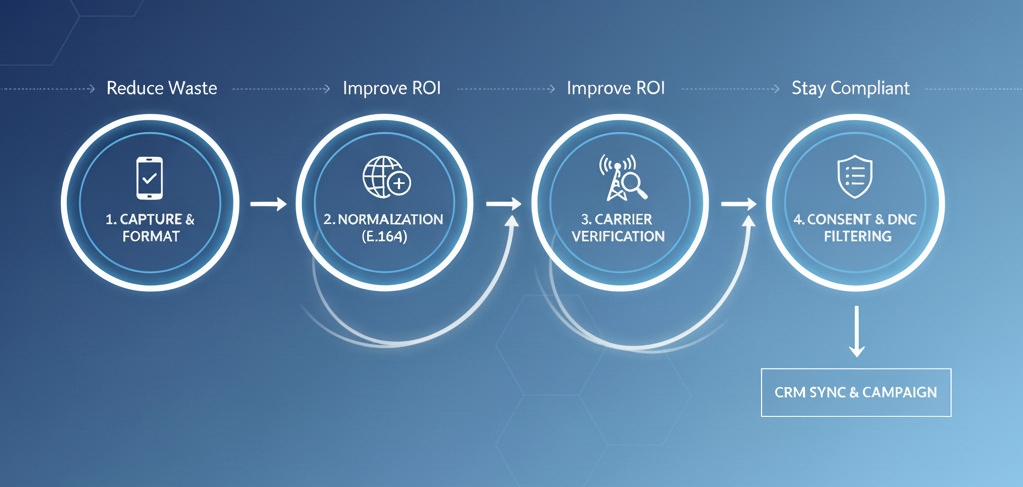
A visual workflow showing the four stages of validation from lead capture to campaign launch.
Clean Your List Now with FoneSwift
Ready to reduce bounce rates and improve campaign performance? FoneSwift's built-in phone number validator normalizes, verifies, and enriches your contact lists in real-time—flagging invalid numbers, scrubbing DNC entries, and syncing clean data back to your CRM. Plus, with AI-powered calling, power dialing, and usage-based pricing, you can scale confidently across global markets.
Start your 14-day free trial and clean your list today—no credit card required. Get 100 free validation credits to test carrier-level verification on your existing database.
Enjoyed This Article?
Subscribe to get more insights on AI calling, VOIP, and contact center automation delivered weekly.