
How to Clean Your Contact Database in Minutes: Complete Phone List Validation Guide
Your contact list is only as good as the data it contains. A single invalid phone number wastes your time, burns your budget, and tanks campaign performance. Yet most teams ignore database quality until it's too late.
Here's the reality: 20-30% of contact lists contain invalid, inactive, or misformatted phone numbers. When you multiply that across thousands of contacts and dozens of campaigns, the costs add up fast. Bad data kills SMS delivery rates, reduces call connect rates, and erodes trust with your customers. The good news? You can clean your entire database in minutes using bulk phone validation.
Skip to the tool: Try FoneSwift's free bulk phone validator to clean up to 1,000 phone numbers instantly. No sign-up required.
TL;DR: Quick Summary
Database cleanup is a revenue-generating exercise that takes 15 minutes and saves thousands annually. Upload your CSV or Excel file, validate thousands of numbers against international standards, export cleaned lists, and re-import into your CRM. Invalid phone numbers waste 15-20% of outreach budgets and destroy campaign metrics. One bulk validation session identifies and removes bad data, boosting SMS delivery rates by 20-30%, call connect rates by 15-25%, and reducing per-contact campaign costs significantly.
Why Phone List Cleaning Really Matters
Invalid phone numbers create invisible costs throughout your organization. Your SMS platform charges you per message, even if it bounces. Your sales team wastes dialers trying to reach dead numbers. Your marketing campaigns show lower performance metrics than they actually deserve.
Consider this scenario: You have 50,000 contacts in your CRM. 15% are invalid or inactive (7,500 numbers). You send an SMS campaign to all 50,000 at $0.01 per message. That's $75 wasted on bounces that never reached anyone. Over 10 campaigns monthly? That's $750 in pure waste. Annually? That's $9,000+ going straight to carrier infrastructure instead of your bottom line.
Now multiply that across phone, SMS, voice campaigns, and email integrations. Suddenly, database cleanup becomes a major profit center, not a chore.
The Hidden Business Impact of Bad Phone Data
Beyond immediate cost waste, poor data quality cascades through your entire business:
Campaign Performance Degradation: Invalid numbers lower your delivery rates and engagement metrics, making your campaigns appear underperforming when they're actually solid. Your reporting becomes unreliable.
Team Efficiency Drain: Your sales reps waste 15-20% of their time dialing dead numbers instead of talking to real prospects. That's nearly a full workday per rep per week spent on wasted effort, across your entire team.
Compliance & Reputation Risk: Sending to disconnected or reassigned numbers triggers spam complaints and carrier filtering. This damages your sender reputation and can get your numbers flagged or blocked.
Lead Quality Collapse: When your database quality is low, your lead scoring and predictive analytics become unreliable. Bad data in means bad insights out. Your entire decision-making framework deteriorates.
Customer Experience Damage: Reaching wrong numbers or inactive lines frustrates customers, damages your brand reputation, and wastes their time. This erodes trust.
One thorough database cleanup eliminates all these problems simultaneously.
How to Clean Your Contact List in 3 Steps
The process is straightforward. Here's exactly what to do:
Step 1: Export Your Contact List
Start by exporting your contacts from your CRM, marketing platform, or database. Most systems let you bulk export as CSV or Excel files.
Make sure your export includes:
- Phone numbers in any format (our tool handles them all)
- Contact name or ID for reference
- Any other relevant metadata you want to keep
Step 2: Validate Your Numbers Using Our Bulk Validator
Upload your CSV or Excel file to FoneSwift's free bulk phone validator. The tool instantly validates every number, detects carriers, identifies line types (mobile, landline, VoIP), and flags invalid entries.
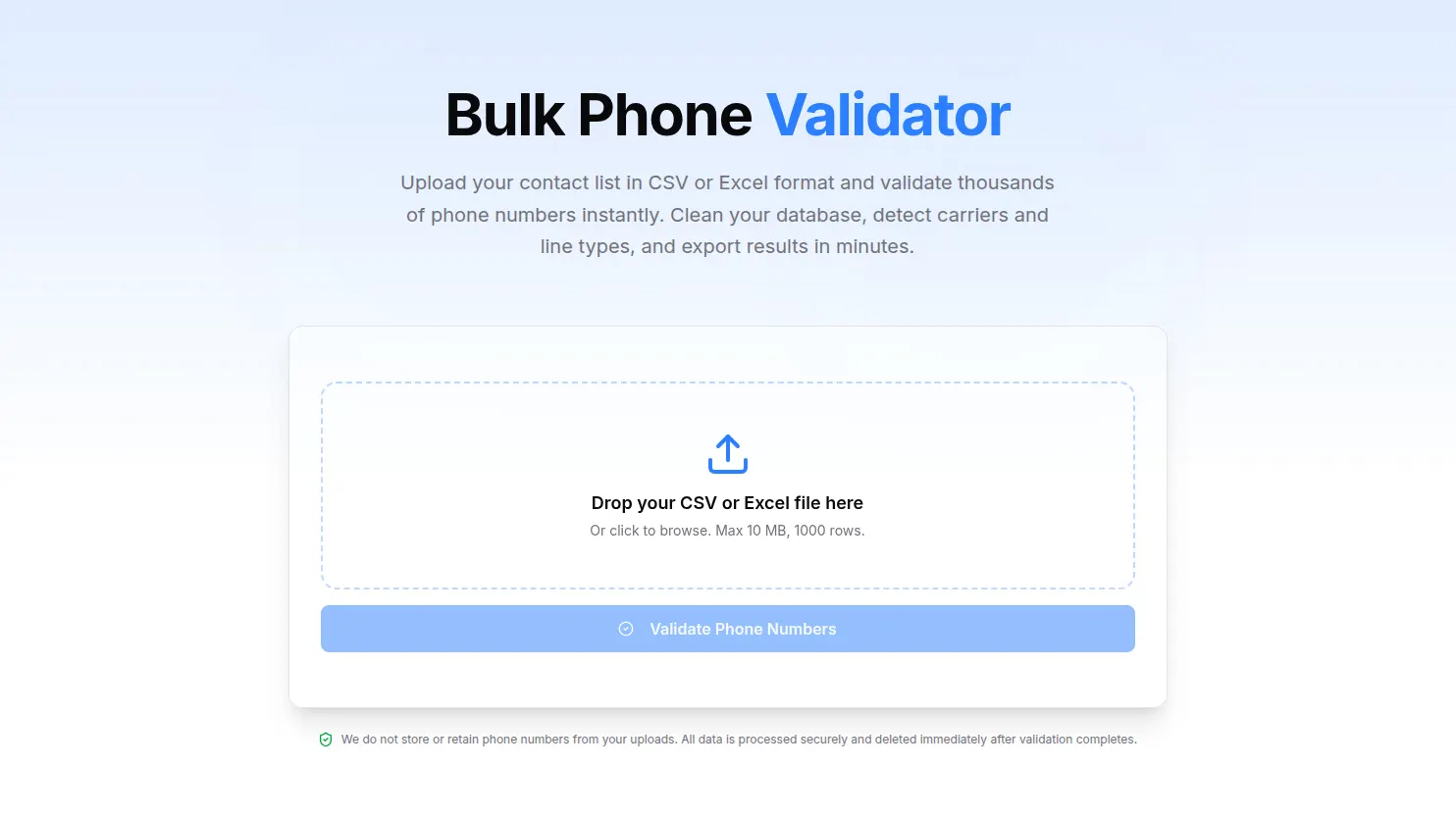 Upload your file and start validation instantly. No sign-up required.
Within seconds to minutes, you'll have complete validation results for your entire list. The tool:
- Validates up to 1,000 rows per upload (roughly 5,000-10,000 numbers)
- Auto-detects your phone number column
- Handles mixed formats automatically
- Processes files in 10-30 seconds depending on size
Step 3: Review, Filter, and Export Results
Download your validation results as CSV or Excel. The validator gives you:
- A clear view of which numbers are valid and which are invalid
- Carrier information for each number
- Line type data (useful for segmenting SMS-only campaigns)
- Standardized E.164 format for all numbers
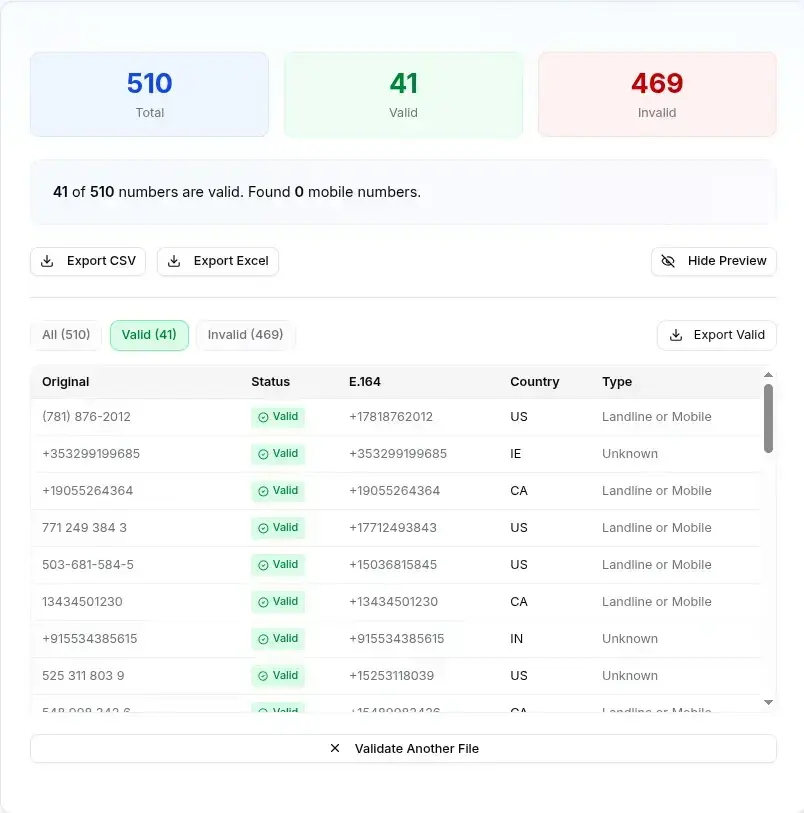 Filter by valid or invalid numbers, then export only what you need.
You can now:
- Export all results together
- Export only valid numbers to re-import into your CRM
- Export only invalid numbers for separate review and follow-up
Re-import the cleaned list back into your CRM or marketing platform. That's it.
What Our Bulk Validator Actually Checks
The validator performs comprehensive validation, not just basic error flagging:
Format Validation: Checks if the number follows correct international standards for its country. A 10-digit US number missing the country code gets flagged and reformatted to E.164.
Carrier Detection: Identifies which mobile or landline carrier owns the number. Use this to exclude carriers with poor delivery reputation or to segment campaigns by carrier type.
Line Type Identification: Distinguishes between mobile numbers (best for SMS), landlines (better for voice), and VoIP services (variable delivery quality).
Country Identification: Automatically detects which country the number belongs to, even if the country code is missing or in wrong format.
Format Conversion: Converts between national, international, and E.164 formats so your database stays standardized across all systems.
Why E.164 Format Matters for Your Database
E.164 is the international standard for phone numbers. It looks like +14155552671. Every number starts with plus, followed by country code, then the local number.
Why standardize to E.164? Because it's truly universal. Any system can understand it. Your CRM integrations work better. Your SMS platform needs it for deliverability. Your APIs expect it. Voice services require it.
When you validate your list and convert to E.164 format, you create a database that works seamlessly across all your tools and integrations. No more format confusion. No more integration headaches. No more failed message sends due to formatting issues.
Who Should Clean Their Database First
Database cleanup isn't just for marketers. Every department benefits:
Sales Leaders: Your reps waste 20% of daily dial time on invalid numbers. Cleaning your list immediately improves connection rates and team productivity.
Marketing Managers: Invalid numbers directly reduce campaign metrics. Clean data means accurate ROI reporting and better budget allocation decisions.
Contact Center Managers: Bad numbers create frustrated customers and unhappy agents. Validation reduces call abandonment and improves agent satisfaction scores.
Lead Generation Agencies: Data quality is your primary competitive advantage. Clean lists build client trust, reduce refund requests, and improve retention.
Customer Success & Support Teams: Invalid numbers prevent timely outreach. Fresh validated data keeps your retention and support campaigns effective.
Common Database Cleaning Mistakes to Avoid
Don't fall into these traps when cleaning your contacts:
Deleting Invalid Numbers Without Review: Some flagged numbers might just be formatted wrong. Always review before deleting. Our validator shows you exactly what's wrong so you can decide whether to fix or remove.
Ignoring Carrier Information: Not all valid numbers are equally valuable. Landlines aren't suitable for SMS campaigns. VoIP numbers carry different carrier reputation. Use this data to segment strategically.
Validating Once and Never Again: Phone numbers change. People change carriers. New lines get assigned to different purposes. Plan to validate quarterly or whenever you import new list segments.
Forgetting about Duplicates: Even after validation, your list might have duplicates (same number, different formatting). Remove those separately before re-importing to your CRM.
Not Standardizing Format After Validation: After validation, ensure everything converts to E.164 before import. Don't let mixed formats creep back in and create future integration problems.
Best Practices for Maintaining Clean Data
Once your list is clean, keep it that way with these practices:
Implement Validation on New Imports: When new contacts join your list (from web forms, API integrations, lead providers), validate immediately. Don't wait for quarterly cleanups.
Schedule Quarterly Audits: Every 90 days, export and re-validate your main list to catch carrier changes, reassigned numbers, and new invalid entries that accumulate.
Monitor Bounce Rates by Source: Track SMS and voice bounce rates separately by data source. High-bounce sources need more frequent validation or vetting.
Use Segment-Level Validation: If you import contacts in batches from different providers, validate each batch separately. Some sources are reliably cleaner than others.
Document Validation Dates: Keep records of validation dates and results. This helps with compliance audits, trend analysis, and vendor performance evaluation.
Quantified Results You'll See After Cleaning
After a full database cleanup, expect these measurable improvements:
| Metric | Before | After | Improvement |
|---|---|---|---|
| SMS Delivery Rate | 70-75% | 90-95% | +20-30% |
| Call Connect Rate | 60-65% | 75-85% | +15-25% |
| Campaign Cost Per Contact | $0.015 | $0.012 | -20% savings |
| Wasted Outreach Budget | 15-20% | 2-5% | -65-75% reduction |
| Team Productivity (dial time) | 100% | 120%+ | +20% efficiency |
Most teams see ROI on database cleanup within the first 30 days just from reduced wasted spend and improved campaign metrics.
How FoneSwift's Bulk Validator Streamlines This Process
Our free tool eliminates the busywork:
- Upload CSV or Excel with your contact list
- Automatic phone column detection (no manual column selection)
- Validates up to 1,000 rows free per upload
- Instant results with carrier, country, and line type metadata
- Filter by validity status to review invalid entries separately
- Export to CSV or Excel with all metadata included
- Export valid or invalid lists separately for targeted re-import
- No sign-up required, no account creation needed
- Your data never gets stored or logged after processing completes
For larger lists requiring recurring validation, API access, and real-time HLR lookup (checking if numbers are currently active on carrier networks), check out FoneSwift's enterprise plans.
Step-by-Step Pilot Plan: First Validation Session
Want to see results immediately? Follow this simple pilot:
Time Commitment: 15 minutes
- Export one segment from your CRM (100-500 contacts)
- Visit the free tool at FoneSwift's bulk validator
- Upload your file (drag and drop, or click to browse)
- Review the results (takes seconds to minutes depending on file size)
- Filter for invalid numbers and review why they failed
- Export cleaned list back to CSV
- Compare delivery metrics for this segment before and after re-import
This pilot shows you the exact ROI and business impact you'll see with full database cleanup.
Your Next Steps: Start Cleaning
Bad phone data costs you money and frustrates your team. The solution is simple: validate, review, re-import.
Try FoneSwift's free bulk phone validator right now. Upload your file, get results in minutes, and see how much cleaner your database can be.
Free tier includes:
- Up to 1,000 phone numbers per upload
- Up to 10 MB file size
- Full metadata on every number
- No credit card required
- 14-day free trial on enterprise features
Your sales team will thank you. Your campaigns will perform better. Your budget will stretch further.
Related Reading:
For more context on phone validation standards, check out our E.164 phone number format guide or visit the individual phone number validator tool for single-number checks.
Want to automate this? Learn about FoneSwift's API for validation or explore our enterprise plans for unlimited validation, real-time HLR lookup, and scheduled batch processing.
Enjoyed This Article?
Subscribe to get more insights on AI calling, VOIP, and contact center automation delivered weekly.